SiteGround vs Bluehost: Which Web Hosting Service Wins in 2025?
Choosing a web host is a lot like picking your favorite coffee shop.
Think of SiteGround as that sleek, modern specialty cafe downtown. The baristas are award-winning experts, the espresso machine is state-of-the-art, and everything moves with precision speed. It might cost a dollar or two more, but you know you're getting a premium experience that's crafted for performance.
On the other hand, Bluehost is your friendly neighborhood diner. It's been around forever, everyone knows it, and the menu is huge. It's affordable, welcoming to newcomers, and gets the job done without any fuss. It might not have the artisanal flair, but it's reliable and fits perfectly within a budget.
Both are titans in the industry, but they serve very different needs. In this SiteGround vs Bluehost 2025 comparison, we're stripping away the marketing fluff to look at the raw data—speed, security, and value—to help you decide which table you should sit at.
At a Glance: The Comparison Table
If you're in a rush, here's the quick breakdown of how these two stack up against each other.
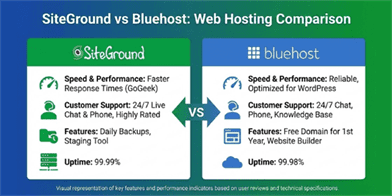
| Feature | SiteGround | Bluehost |
|---|---|---|
| Best For | Performance, Agencies, eCommerce | Beginners, Bloggers, Budget Users |
| Infrastructure | Google Cloud Platform (Premium) | Traditional Shared Servers |
| Starting Price | ~$3.99/mo (Higher renewal) | ~$3.99/mo (Lower renewal) |
| Free Domain | ❌ No (Usually paid) | ✅ Yes (Free for 1st year) |
| Storage | 10GB - 40GB SSD | 10GB - 100GB NVMe |
| Performance | Ultrafast PHP, 5x Caching | Optimized SSD, Standard Caching |
| Support | 24/7 Expert Chat/Phone (Fast) | 24/7 Chat/Phone (Standard) |
| Migration | Free Plugin + Paid Expert | Free WordPress Migration Tool |
1. Pricing and Value: The "Neighborhood Diner" Wins on Budget
When you look at the sticker price, both hosts often start around the same $3.99/mo mark for their entry-level plans. However, the value proposition shifts when you look closer at the renewals and extras.
Bluehost is the clear winner for pure affordability. Not only do they include a free domain name for the first year (saving you ~$15), but their renewal rates are generally softer on the wallet, jumping to around $9.99/mo.
SiteGround, conversely, positions itself as a premium service. You likely won't get a free domain, and while the intro price is low, the renewal stings a bit more at roughly $17.99/mo. You are paying for the "specialty cafe" infrastructure here.

2. Ease of Use: Beginners vs. Pros
Bluehost is famous for its "5-minute setup." It is officially recommended by WordPress.org for a reason. Their onboarding wizard holds your hand through the entire process—from picking a theme to writing your first post. It uses a standard cPanel interface that is easy to navigate for anyone who has never run a website before.
SiteGround ditched the traditional cPanel for their own custom Site Tools dashboard. Honestly? It's better. It's cleaner, more modern, and lets you pin your favorite tools. Plus, their AI Starter tool can help generate a site layout for you. It offers more control for developers (staging sites, Git integration) but remains intuitive enough for non-techies.
3. Performance and Speed: The "Specialty Cafe" Speed
This is where SiteGround leaves the competition in the dust.
They run their entire infrastructure on the Google Cloud Platform. This means your site is hosted on the same high-performance network that powers Google itself. Add in their Ultrafast PHP setup and custom SuperCacher technology, and you get a hosting environment that is consistently 5x faster than standard shared hosting.
Bluehost is no slouch—they've upgraded to NVMe storage and have reliable uptime—but they use traditional shared servers. Under heavy traffic, a Bluehost site might start to stutter like a busy diner during the lunch rush, whereas SiteGround keeps serving espresso shots with clockwork precision.

4. Security: Fort Knox vs. Standard Locks
Security isn't just an add-on anymore; it's a necessity.
SiteGround takes a proactive approach. Their servers check themselves every 0.5 seconds for issues. They have an AI-driven anti-bot system that blocks millions of security threats daily before they even reach your site.
Bluehost provides the basics: free SSL certificates and basic malware scanning. They offer good account isolation (so one infected site on a server doesn't affect yours), but advanced tools like SiteLock or CodeGuard are often paid add-ons.
5. Customer Support: The Experts Are In
If your website goes down at 3 AM, who do you want picking up the phone?
SiteGround boasts a 98% customer satisfaction rate, and it shows. Their support agents are technically proficient—they don't just read from a script; they actually fix the problem. They also offer an AI assistant for instant answers.
Bluehost offers 24/7 support via chat and phone as well. They are helpful and friendly, great for general questions like "how do I add an email account?" However, for complex technical issues, you might find yourself escalated a few times before finding a resolution.
Pros and Cons Summary
SiteGround
Pros:
- Google Cloud Infrastructure: Top-tier speed and reliability.
- Advanced Security: AI bot protection and custom firewalls.
- Developer Friendly: Staging environments and Git tools included.
- Superior Support: Fast, knowledgeable help when you need it.
Cons:
- Higher Renewal Price: Quality comes at a premium.
- Storage Limits: Capped at 40GB even on higher plans.
- No Free Domain: You'll usually pay extra for your .com.
Bluehost
Pros:
- Budget Friendly: Lower renewal rates and free domain included.
- Beginner Focus: The easiest setup wizard for WordPress.
- Generous Storage: Up to 100GB on shared plans.
- Official Recommendation: Endorsed by WordPress.org.
Cons:
- Performance: Can slow down under high traffic loads.
- Upsells: The checkout process pushes a lot of paid add-ons.
- Fewer Tech Tools: Missing some advanced features for developers.
Conclusion: Who Wins?
There is no black-and-white winner here because it depends entirely on you.
- Choose SiteGround if: You are building a business site, an online store, or a blog that you expect to grow. You value speed, security, and premium support and are willing to pay a few dollars more for peace of mind. It is the "Specialty Cafe" experience.
- Choose Bluehost if: You are starting your very first blog, working on a tight budget, or just want to get online as easily as possible. You want the "Neighborhood Diner" experience—friendly, affordable, and reliable enough for everyday needs.
Frequently Asked Questions (FAQ)
Q: Which is better for WordPress, SiteGround or Bluehost?
A: For pure performance and speed, SiteGround is the better choice due to their Google Cloud infrastructure and custom caching. However, Bluehost is easier for beginners to set up and is officially recommended by WordPress.org.
Q: Does SiteGround offer a free domain?
A: Typically, no. SiteGround rarely offers a free domain name with their plans, whereas Bluehost includes a free domain for the first year with most shared hosting packages.
Q: Is Bluehost good for beginners?
A: Yes, Bluehost is widely considered the best host for beginners. Their onboarding wizard guides you through the entire setup process, making it incredibly easy to launch a WordPress site with no technical knowledge.
Q: Which host has better uptime?
A: Both hosts offer strong uptime guarantees (typically 99.9%). SiteGround's use of Google Cloud infrastructure often gives them a slight edge in stability and consistency.
Q: How much do renewals cost?
A: This is a key difference. SiteGround's renewal rates jump to around $17.99/mo for their StartUp plan, while Bluehost renews at a more affordable rate of approximately $9.99/mo.