HostGator vs Bluehost: Which EIG Giant Wins in 2025?
Choosing between HostGator and Bluehost is like picking between Pepsi and Coke—they're both owned by the same parent company (Endurance International Group/Newfold Digital), but each has cultivated its own distinct flavor and loyal following.
HostGator is the fun-loving, feature-packed option. With their iconic alligator mascot and "unmetered" everything approach, they appeal to users who want flexibility, scalability, and don't mind a bit of marketing flair. They've been around since 2002 and host millions of websites with a reputation for reliability and generous resources.
Bluehost, on the other hand, is the WordPress darling. As one of only three hosting providers officially recommended by WordPress.org, they've built their entire brand around making WordPress hosting accessible to beginners. They're the go-to choice for first-time website owners who want a guided, hand-held experience.
Both are budget-friendly powerhouses with similar infrastructure, but they cater to different priorities. In this HostGator vs Bluehost 2025 comparison, we're diving into pricing, performance, features, and support to help you decide which EIG host deserves your business.
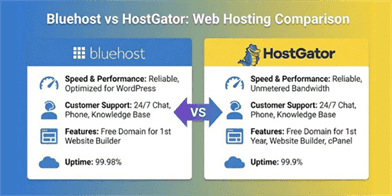
At a Glance: The Comparison Table
If you're in a rush, here's how these two popular hosts stack up against each other.
| Feature | HostGator ???? | Bluehost ???? |
|---|---|---|
| Best For | Resellers, Small Businesses, Scalability | WordPress Beginners, First-Time Users |
| Starting Price | ~$2.75/mo (36-month plan) | ~$2.95/mo (36-month plan) |
| Renewal Price | ~$10.99/mo | ~$10.99/mo |
| Free Domain | ✅ Yes (All shared plans, 1st year) | ✅ Yes (All shared plans, 1st year) |
| Storage | Unmetered (SSD) | 10GB - 100GB (NVMe) |
| Bandwidth | Unmetered | Unmetered |
| Control Panel | cPanel (Industry Standard) | Custom Bluehost Panel |
| WordPress Integration | One-Click Install, Standard Setup | Official WordPress.org Partner |
| Support | 24/7 Chat/Phone/Tickets | 24/7 Chat/Phone/Tickets |
| Money-Back Guarantee | 45 Days | 30 Days |
1. Pricing and Value: Nearly Identical, With Small Differences
Since both hosts are owned by the same parent company, their pricing strategies are remarkably similar—but there are a few key differences.
HostGator starts at $2.75/mo for their Hatchling plan (36-month commitment), which includes one website, unmetered storage and bandwidth, and a free domain for the first year. Renewals jump to $10.99/mo. They also offer a generous 45-day money-back guarantee.
Bluehost is priced at $2.95/mo for their Basic plan (36-month term), including one website, 10GB storage, unmetered bandwidth, and a free domain for the first year. Renewals are also $10.99/mo, matching HostGator. However, their money-back guarantee is only 30 days.
Winner: HostGator edges ahead slightly with a lower intro price and a longer 45-day money-back guarantee, giving you more time to test the service.

2. Performance and Speed: Similar Infrastructure, Similar Results
Here's the truth: since both hosts share the same parent company infrastructure, their performance is remarkably similar.
HostGator uses traditional Apache servers with SSD storage. Load times typically range from 600ms to 1.2 seconds depending on server load. Uptime is solid at 99.9%+, and they have multiple data centers for redundancy.
Bluehost has upgraded to NVMe storage on some plans, which provides a slight edge in disk I/O performance. Load times are comparable to HostGator, ranging from 600ms to 1 second. They also maintain 99.9%+ uptime.
Winner: Slight edge to Bluehost for NVMe storage on newer plans, but the difference is marginal. Both deliver acceptable (but not exceptional) performance for budget hosting.

3. Ease of Use: cPanel vs. Custom Dashboard
HostGator uses the industry-standard cPanel, which millions of users are already familiar with. If you've used web hosting before, you'll feel right at home. Their interface is straightforward, and one-click installers make setting up WordPress, Joomla, or other CMSs simple.
Bluehost developed their own custom control panel that's specifically optimized for WordPress. Their onboarding wizard is legendary—it literally holds your hand through every step of launching your first WordPress site, from choosing a theme to writing your first post. It's incredibly beginner-friendly.
Winner: Bluehost for absolute beginners building WordPress sites. HostGator for users who prefer the familiar cPanel interface or are building non-WordPress sites.
4. WordPress Experience: Official Partner vs. Standard Support
Bluehost is one of only three hosting providers officially recommended by WordPress.org. This endorsement means deep WordPress integration, automatic updates, and a setup process specifically designed for WordPress users. If you're building a WordPress site and want the "official" experience, Bluehost is the clear choice.
HostGator fully supports WordPress with one-click installation and automatic updates, but they don't have the official WordPress.org endorsement. Their WordPress experience is solid but more generic—it's not their primary focus like it is for Bluehost.
Winner: Bluehost dominates for WordPress-specific hosting thanks to their official partnership and WordPress-optimized onboarding.
5. Features and Resources: Unmetered vs. Defined Limits
HostGator advertises "unmetered" storage and bandwidth on all shared plans, which sounds unlimited but comes with acceptable use policies. They include free SSL, $200 in marketing credits (Google Ads, Bing), and weekly backups. Their Baby and Business plans support unlimited websites.
Bluehost is more transparent with defined storage limits (10GB to 100GB depending on plan) but offers unmetered bandwidth. They include free SSL, free domain for the first year, $200 in marketing credits, and free Microsoft 365 email for 30 days. Advanced features like CodeGuard backups and SiteLock security are paid add-ons.
Winner: HostGator for "unmetered" resources and included weekly backups. Bluehost for transparency and Microsoft 365 trial.
6. Customer Support: Both Offer 24/7, Quality Varies
Both hosts provide 24/7 support via live chat, phone, and tickets—but the quality can be hit or miss.
HostGator support is generally helpful for basic questions, but response times can be slow during peak hours. Phone support is available, which is great for users who prefer talking to someone directly. Knowledge base is comprehensive.
Bluehost support is similarly structured with 24/7 availability across all channels. They're particularly good at helping WordPress beginners through common issues. However, like HostGator, wait times can be long, and support quality can be inconsistent.
Winner: Tie. Both offer the same support channels with similar quality and response times.
7. Reseller Hosting: HostGator's Specialty
If you're interested in reseller hosting (buying hosting in bulk to resell to your own clients), HostGator has a clear advantage.
HostGator offers robust reseller hosting plans with WHM/cPanel, white-label options, and flexible resource allocation. They're a popular choice for web designers and agencies who manage multiple client websites.
Bluehost doesn't emphasize reseller hosting as much. While they offer VPS and dedicated options, their focus is primarily on shared WordPress hosting for individual users.
Winner: HostGator for reseller hosting and agency use cases.
Pros and Cons Summary
HostGator ????
Pros:
- Unmetered Resources: No hard storage/bandwidth limits.
- cPanel Included: Industry-standard control panel.
- 45-Day Money-Back: Longer guarantee period.
- Reseller Hosting: Excellent options for agencies.
- Weekly Backups: Included on all plans.
Cons:
- Average Performance: Not the fastest hosting option.
- Aggressive Upsells: Lots of add-ons during checkout.
- Support Quality: Can be inconsistent during peak times.
Bluehost ????
Pros:
- WordPress.org Recommended: Official WordPress partner.
- Beginner-Friendly: Excellent onboarding wizard.
- NVMe Storage: Faster disk performance on newer plans.
- WordPress Optimized: Deep WordPress integration.
- Marketing Credits: $200 in Google/Bing ads.
Cons:
- Storage Limits: Defined limits vs. "unmetered."
- 30-Day Guarantee: Shorter than HostGator's 45 days.
- Aggressive Upsells: Many paid add-ons pushed.
- Average Performance: Similar to HostGator, not exceptional.
Conclusion: Who Wins?
Since both hosts share the same parent company infrastructure, the choice comes down to your specific use case and preferences.
- Choose HostGator if: You want unmetered resources, cPanel, and reseller options. If you're a web designer managing multiple client sites, need the flexibility of "unlimited" storage, prefer the familiar cPanel interface, or want the longer 45-day money-back guarantee, HostGator is your best bet. It's also great for non-WordPress sites.
- Choose Bluehost if: You're building a WordPress site as a complete beginner. If you've never built a website before, want the official WordPress.org endorsement, need maximum hand-holding through the setup process, and value WordPress-specific optimization, Bluehost's beginner-friendly approach is unmatched.
Our Pick: For WordPress beginners, Bluehost wins thanks to their official WordPress partnership and superior onboarding. For everyone else (resellers, agencies, non-WordPress users), HostGator offers better flexibility with cPanel and unmetered resources. Performance-wise, they're virtually identical.
Frequently Asked Questions (FAQ)
Q: Are HostGator and Bluehost owned by the same company?
A: Yes, both HostGator and Bluehost are owned by Newfold Digital (formerly Endurance International Group/EIG). This means they share similar infrastructure, pricing strategies, and backend systems, though they maintain separate brands and target different audiences.
Q: Which is better for WordPress, HostGator or Bluehost?
A: Bluehost is better for WordPress users, especially beginners. They're one of only three hosting providers officially recommended by WordPress.org, and their entire platform is optimized for WordPress with guided setup and deep integration.
Q: Does HostGator really offer unlimited storage?
A: HostGator advertises "unmetered" storage and bandwidth, not truly unlimited. They have acceptable use policies that prevent abuse. For typical websites, you won't hit these limits, but resource-intensive applications may be restricted.
Q: Which host has better customer support?
A: Both offer 24/7 support via chat, phone, and tickets with similar quality and response times. Support can be inconsistent on both platforms, especially during peak hours. Neither has a significant advantage in this category.
Q: Can I use cPanel with Bluehost?
A: No, Bluehost uses their own custom control panel optimized for WordPress. HostGator uses the industry-standard cPanel, which many users prefer for its familiarity and flexibility.
Q: Which host offers a longer money-back guarantee?
A: HostGator offers a 45-day money-back guarantee, while Bluehost only offers 30 days. This gives you more time to test HostGator's service risk-free.